FilesMessagesContactsMANAGEMENTDOCUMENTDATA · DOCUMENT · WORKFLOWFolders & nomenclaturesMetadata & Doc ExplorerRole-based rightsApproval workflowsVersions & history
Document and workflow management

DATA, DOCUMENT & WORKFLOW

Fast access. Organization. Long-term document safety.

Your support in efficiently managing a large volume of documents: archiving, metadata-based organization, access rights and approval workflows, in a single web application.

Fast accessto documents for authorized persons, based on username and password
Hierarchical structurefolders, subfolders and organization criteria
Unlimitedusers in the organization; no limit on the number of accounts
Web applicationaccess from the browser, independent of the operating system
01 · Overview · A web application, not a local program

Documents become organized, accessible and controlled information.

MOBIUS Data, Document & Workflow supports the organization in efficiently managing a large volume of documents. Its main function is archiving and managing them — document management.

Another important function is organizing and building document workflows. The application is installed on a server and accessed through a web browser, with no installation on users' computers.

Long-term safetyArchived documents take up less space and can be accessed anytime, anywhere by authorized persons.
Controlled accessWhat a user can do is limited by the rights granted by the administrator, according to role and department.
Automated processesPredefined workflows help automate processes in order to increase productivity.
MOBIUS DDWDocuments · Workflows
Files & messagesFolders and nomenclatures
MetadataRetrieval criteria
Doc ExplorerFilters and search
VersionsCheck Out and history
RightsRoles and departments
WorkflowsApproval and owners
02 · What DDW addresses · The organization's challenges

Questions answered within the same application.

MOBIUS Data, Document & Workflow turns the everyday questions of users and management into verifiable answers, available instantly.

“Where can I quickly find the document I need?”
DDW
Answer in the platform: In Doc Explorer, by choosing the folder and applying filters: name, type, issuing organization, external or registration number, physical archive location, date or the person who entered it.
“How do I prevent two people from editing the same document at the same time?”
DDW
Answer in the platform: Through Check Out: the document is temporarily locked for editing but remains available for viewing. The final version can be marked and can no longer be modified.
“Who is allowed to view, modify or delete documents?”
DDW
Answer in the platform: Rights are granted by the administrator by role and department. Modifying and deleting are not allowed for all users, and each user only sees the documents for which they have permissions.
“How do I send a document for approval without physical circulation?”
DDW
Answer in the platform: Through workflows predefined by the administrator: the document goes through the established phases, each with a designated owner, and the route is saved for reuse.
“Can I go back to documents and previous versions at any time?”
DDW
Answer in the platform: Yes. The application allows access to all documents at any time and keeps version traceability for each document, according to access rights.
03 · Features · Data, Document & Workflow

Organization, safety and confidentiality for the organization's documents.

The tools work together, from registering a document to consulting its history, on the same base of users, roles and folders.

FEATURE 01

Hierarchical organization

Documents are organized in folders with a tree structure; a folder can contain subfolders, which in turn contain documents.

FEATURE 02

Metadata and nomenclatures

Files, messages and contacts are added to existing or new folders, grouped through nomenclatures and completed with metadata. Administrators define their own nomenclatures and metadata categories.

FEATURE 03

Doc Explorer and filters

Filtering by name, document type, issuing organization, external number, registration number, physical archive location, issue date and the person who entered the document.

FEATURE 04

Check Out and final version

A user with rights can temporarily lock a document for editing, while others can still view it. The document can be marked as the “final version” and can no longer be modified.

FEATURE 05

Rights and confidentiality

Rights are granted by the administrator according to role and department. When a new account is created, the system automatically generates a dedicated folder for the user, accessible to them and their hierarchical superiors.

FEATURE 06

Document workflows

Predefined approval routes, with linear and parallel phases, a decision-maker and a designated owner for each phase. Workflow modeling is reserved for administrators.

FEATURE 07

History and versions

Version traceability for each document and access to documents at any time, according to access rights.

FEATURE 08

Import and integration

Document import (for example PDF, XML) and integration with other solutions or systems through web services. A web application independent of the operating system.

04 · The document lifecycle

From registration to approval, each stage stays in a coherent flow.

Metadata, responsibilities and versions accompany the document along the route configured by the organization, in the 6 stages below.

01

Registration

file, message or contact

02

Classification

folder and nomenclature

03

Metadata

document type and search criteria

04

Assignment

role, group and owner

05

Approval

linear or parallel phases, decision

06

Archiving

history, versions and retrieval

Anatomy of a document record in MOBIUS DDW

Complete records: content, access, workflow and history
1. Identity & TypeFile, message or contact, the document/file type set at registration and the name.
2. Folder & NomenclaturePosition in the folder tree structure and grouping through nomenclatures defined by administrators.
3. Retrieval metadataIssuing organization, external number, registration number, physical archive location, issue date, the person who entered the document.
4. Rights & AccessPermissions by user, role and department; modification and deletion rights granted by the administrator.
5. Workflow & OwnersThe predefined route, the current phase, the owner of each phase and the decision points.
6. Versions & HistoryNew versions added along the workflow, Check Out or “final version” status and access to the history.
05 · Document workflows · User, Administrator and Owner

People collaborate on clear routes, without documents circulating physically.

The document workflow makes it possible to send documents along a predefined route — a collaborative environment with precise rules and procedures. Preset routes are saved and can be used whenever the defined steps are needed.

USER
Registers documents, completes metadata, uses the predefined workflows, adds new versions and consults the history, within the limits of the rights granted.
ADMINISTRATOR
Models the workflows (a function reserved for administrators), defines the nomenclatures and metadata categories, assigns roles and creates groups with different rights.
OWNER
Each phase of a workflow is assigned to a user of the system, who processes the document and passes it on or makes a decision.
01

Create

Register the document and fill in its type and the associated metadata.

02

Route

Send the document along the predefined route for processing.

03

Collaborate

Add new versions, add or edit metadata along the workflow.

04

Decide

Interleave linear phases with parallel phases and the decision-maker.

05

Finalize

Mark the “final version”, which can no longer be modified.

06

Archive

Keep the document, its route and its history for later consultation.

06 · Benefits · Control over documents and decisions
The right document reaches the authorized person, in the right context and version.
ClarityViewing documents structured hierarchically, by folders and criteria.
ControlRights by role and department; modifying and deleting are not allowed for everyone.
CollaborationPredefined workflows, with an owner for each phase and decision points.
TraceabilityVersions for each document and access to the history at any time.
Operational dimension
Without MOBIUS DDW (scattered documents, physical or email circulation)
With MOBIUS DDW (Data, Document & Workflow)
1. Finding documents
Time lost searching
Searching through folders, emails and physical archives, with no common identification criteria.
Easy and fast identification
Metadata filled in at registration and filters in Doc Explorer, on hierarchical folders.
2. Simultaneous editing and versions
Multiple copies of the same file
It is unclear which is the current version; overlapping changes and lost versions.
Check Out and final version
Temporary locking for editing, version traceability and marking of the final version.
3. Access and confidentiality
Access that is hard to control
Documents shared without uniform rules, with a risk of unauthorized modification or deletion.
Rights by role and department
Each user sees only what they have permissions for; modification and deletion are restricted by the administrator.
4. The approval route
Physical or email circulation
Documents move between offices with no clear route and no owner for each stage.
Predefined workflows and owners
Saved routes, linear or parallel phases, a decision-maker and a designated owner per phase.
5. User access and archiving
Local installations and storage space used
Applications installed on each workstation and bulky archives that are hard to consult.
A web application, with no user limit
Access from the browser, independent of the operating system; archived documents take up less space and can be accessed anytime by authorized persons.
07 · The platform at work

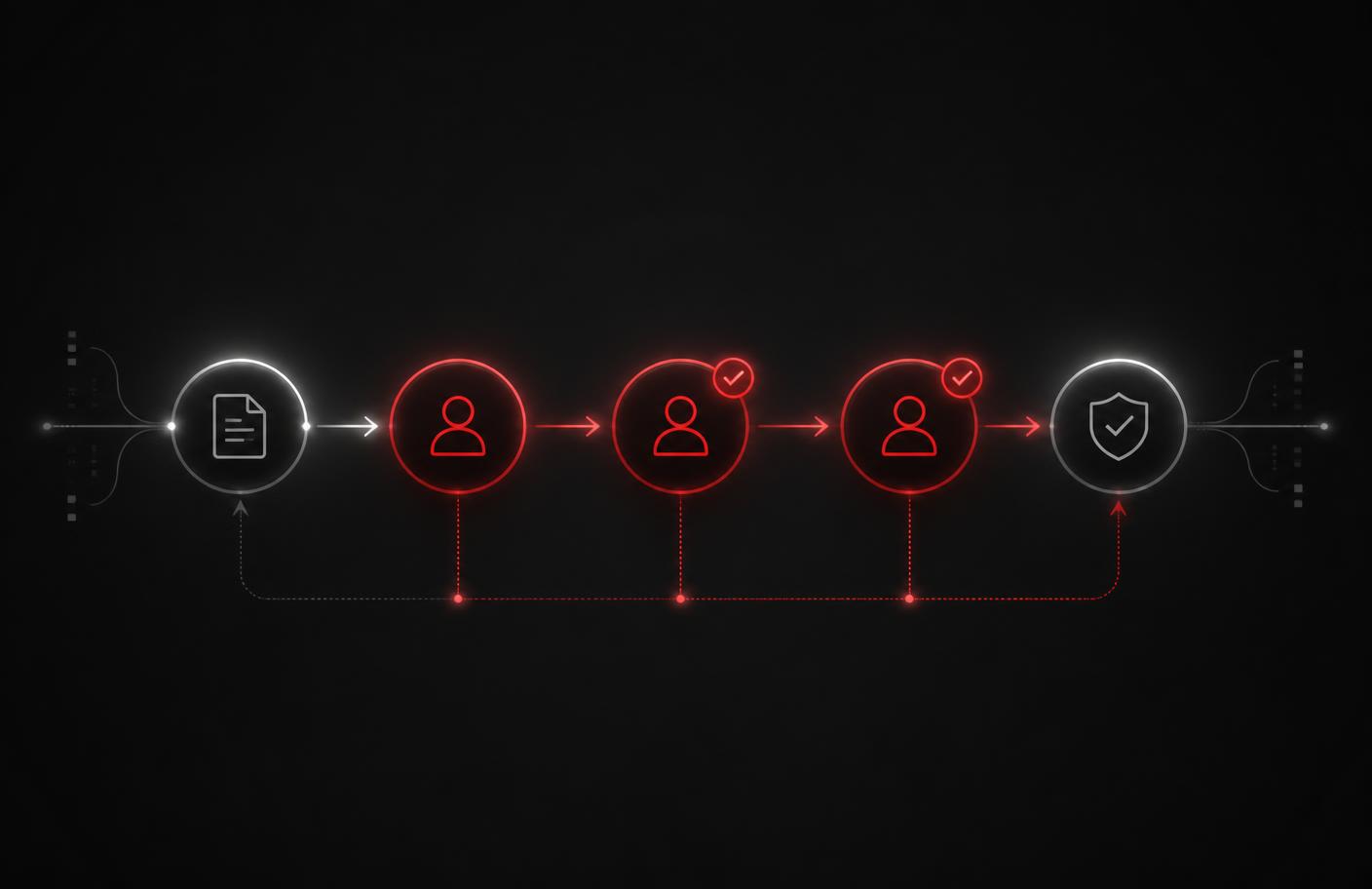
Documents move between owners until final validation.

The working interface for active files provides a graphical tool for an overall view. The diagram shows an approval route with several roles and checkpoints.

Diagram of a document approval workflow in the Mobius platform
A visual representation of the document route.
08 · Applicability · Large volumes and complex routes

Suited to organizations that manage large volumes of documents and complex document routes.

The application does not limit the number of users in the organization and adapts to its own structure through nomenclatures and metadata defined by administrators.

Registry and archiving

Registering, classifying, storing and retrieving documents based on metadata, in private and public organizations.

Approval and collaboration

Circulation of documents between owners, with linear and parallel phases and decision points.

Internal control

Rights by role and department, versions, final documents and an accessible history.

Technical documentation and contracts

Documentation, contracts and correspondence organized in folders, with metadata and controlled versions.
Integration in the MOBIUS solutions ecosystem

09 · Phased implementation · Our involvement at every step

Guided implementation, from route analysis to day-to-day use.

The Mobius team accompanies the organization from the proceduralization of document routes to user training and operational support.

Code
Stage
What we do together with your team
Result for the organization
E1
Analysis and proceduralization
Analysis of existing document routes and definition of the organization's workflows.
✓ Clear routes, defined roles
E2
Configuration
Defining the folder structure, nomenclatures, metadata categories, roles and access rights.
✓ A system aligned with the organization
E3
Document import
Taking over existing documents (for example PDF, XML) and assigning retrieval metadata.
✓ A single, searchable archive
E4
Workflow modeling
The administrator predefines the approval workflows, phases and owners.
✓ Digital, paper-free routes
E5
Training
Hands-on training for users and application administrators.
✓ Autonomous users in a short time
E6
Support and integration
Usage assistance and, if needed, integration with other solutions or systems through web services.
✓ Operational continuity
No limit on the number of users: the application is web-based, installed on a server and requires no installation on users' workstations. Documents can be accessed from any computer with access to the network where the server is located.
Interactive tool · MOBIUS DDW implementation configuration

Quickly assess your organization's priorities for MOBIUS Data, Document & Workflow

Select the options that best describe your current situation for the 4 points below to generate the recommended configuration of stages E1–E6.

Recommended MOBIUS DDW path (E1–E6)

    10 · Let's start now · Contact & Assessment

    Organization, safety and confidentiality for your documents.

    Need help? No matter how hard it seems, our team can help you from scratch — from analyzing document routes to the day-to-day use of the application.

    Direct Phone (Monday – Friday, 09:00 – 18:00)+40 722 377 877
    Call now →
    Commercial & Technical Emailoffice@mobiussoftware.ro
    Open Mail app →

    Request a presentation or an analysis for MOBIUS DDW

    Fill in the form and your request is sent directly from the site to the Mobius Software team.